If you are searching for a Freely TV box, you no longer need to replace your television just to get Freely. Dedicated plug-in devices can add Freely to an existing TV through HDMI and broadband, with no satellite dish required.
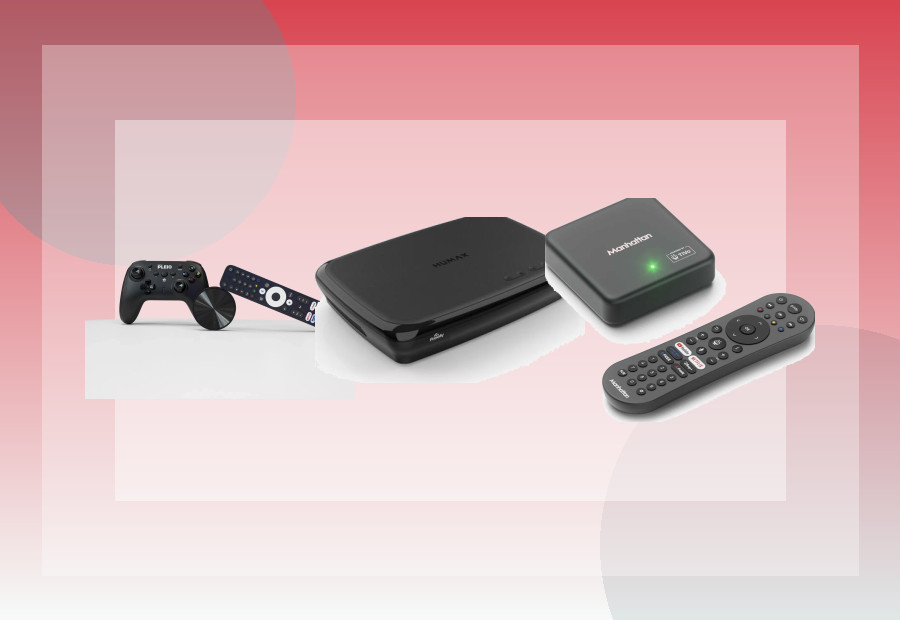
This guide compares the three most relevant routes for UK buyers: Manhattan Aero, Netgem PLEIO and Humax Aura EZ. They solve different problems, so the best choice depends on whether you care most about simplicity, broader app access, gaming or recording.
Freely TV box comparison
| Device | Best for | Freely | 4K | Recording | Platform |
|---|---|---|---|---|---|
| Manhattan Aero | Most households | Yes | Yes | No Freely recording | TiVo OS |
| Netgem PLEIO | Apps + cloud gaming | Yes | Yes | No Freely recording | Google Play access |
| Humax Aura EZ | Aerial recording + Freely | Yes | Yes | Records aerial TV, not Freely streams | Specialist hybrid recorder |
Check Manhattan Aero on Amazon UK →
How much does a Freely TV box cost?
At the time of this September 2026 update, Freely lists the Manhattan Aero from £89. During our September 2026 hands-on test, we checked the Netgem PLEIO 4K Puck at £99 on Amazon UK. Prices can move, so treat these figures as dated context rather than guaranteed checkout prices.
Freely itself does not charge a monthly subscription for the core Freely service. PLEIO’s optional extra channels and cloud-gaming features are a separate subscription proposition.
1. Manhattan Aero — best Freely TV box for most people
Manhattan Aero is the easiest recommendation if your main goal is simply to add Freely to an existing TV. It connects by HDMI, then uses Wi-Fi or Ethernet for live and on-demand television.
Manhattan currently specifies 4K output, HDR10/HDR10+, Wi-Fi 6, Ethernet and TiVo OS. Freely sits alongside mainstream apps including Netflix, Disney+, Prime Video and YouTube, so the box can replace a basic streaming stick as well as add UK live TV.
Why we like it: it has a clear purpose, a conventional remote, wired networking and a relatively simple interface. It is also backed by UK support and a two-year warranty when registered under Manhattan’s terms.
Important limitations: Dolby Vision is not supported, and Freely streamed channels cannot be recorded. If recording is essential, look at the Humax route below.
Read our full Manhattan Aero review for the detailed breakdown.
Check current Manhattan Aero availability →
2. Netgem PLEIO — best Freely box for extra apps and gaming
PLEIO takes a broader entertainment approach. It includes Freely, but also gives access to Google Play and bundles cloud-gaming features through the PLEIO service.
Freely currently lists the PLEIO 4K Puck with 4K HDR, Google Play access, a wireless gamepad and a 12-month PLEIO subscription bundle. Freely itself remains free to use; the subscription relates to PLEIO’s additional channels and gaming features.
Why choose it: in our hands-on test, apps loaded quickly, Wi-Fi was reliable and the included controller worked well enough for light gaming. Google Play access also gives it a broader app proposition than a more closed TV platform.
Why not: picture quality was the main weakness in our test, particularly at close range. There is also no built-in Ethernet port, and we were not able to sideload apps during testing.
3. Humax Aura EZ — best if recording matters
Humax Aura EZ is different from the two dedicated streaming boxes above. It is a hybrid recorder designed to combine Freely with traditional aerial-based television recording.
Humax states that the recorder can record live TV received through an aerial, while Freely streamed content is for live viewing and on-demand playback rather than hard-drive recording.
This distinction matters: there is no conventional ‘record Freely streams’ option. Recording is tied to the aerial side of the device.
Humax also states that Netflix, Prime Video and YouTube are not currently available on Aura EZ, so it is not the best choice if you want one box to replace a full-featured streaming platform.
Check Humax Aura EZ on Amazon UK →
Can you get Freely without buying a new TV?
Yes. A Freely-compatible streaming device plugs into an HDMI port and connects to broadband. Freely says you do not need an aerial or satellite dish for its streaming-device experience.
That makes these boxes especially useful for Samsung, LG and Sony TVs that do not currently have Freely built in, as well as older TVs that still have a usable HDMI port.
If your television is older, also see our streaming-device guide for older TVs.
Do you need a TV licence for Freely?
Yes, if you watch live TV or BBC iPlayer. Freely’s own guidance states that a TV Licence is still required for live television and BBC iPlayer even though Freely itself has no monthly subscription fee.
Can a Freely box record programmes?
Not Freely streams in the traditional PVR sense. Manhattan states that Freely’s streamed content is not recordable. Humax Aura EZ can record channels received through an aerial, which is why it is the better route for households that still want series recording and a hard drive. Our dedicated Freely recorder box guide explains exactly what can and cannot be recorded.
Freely vs Freeview Play
Freely is built around broadband delivery, while Freeview remains closely tied to terrestrial broadcast through an aerial. If you are deciding between the two systems rather than simply choosing hardware, read Freely vs Freeview Play.
Which Freely TV box should you buy?
- Choose Manhattan Aero for the simplest all-round Freely setup.
- Choose Netgem PLEIO if Google Play access and cloud gaming appeal to you.
- Choose Humax Aura EZ if recording aerial television matters more than having every mainstream streaming app.
If you are not committed to Freely, use the ViewHarbour Device Finder to compare Freely hardware with Roku, Fire TV, Google TV and Apple TV options based on what you actually need.